
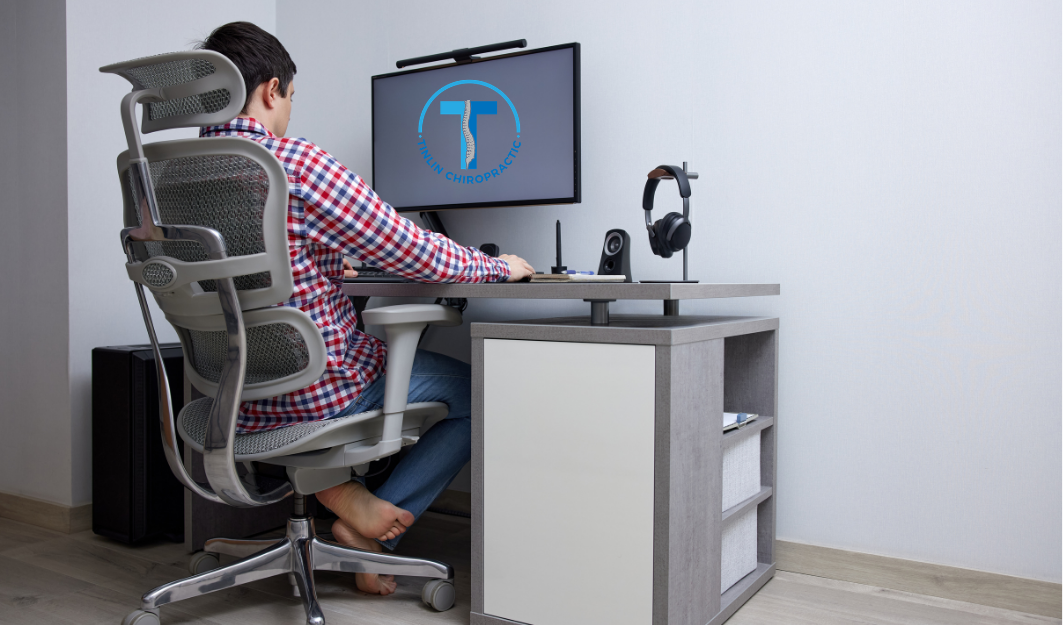
Quick answer: A spine-friendly home office starts with a supportive chair, a monitor at eye level, and a keyboard positioned to keep your elbows close to your body. Proper desk height, adequate lighting, and regular movement breaks round out the setup. If pain persists despite these changes, chiropractic care can help identify and correct underlying spinal issues.
Working from home sounds simple enough: grab a laptop, find a chair, and get to it. But your kitchen table isn’t a desk, and your dining chair definitely wasn’t built to support your spine for eight hours a day. Over time, an improvised setup can quietly wreak havoc on your neck, shoulders, and lower back.
At Tinlin Chiropractic in Louisville, KY, we treat patients regularly whose pain traces back to how they’re working, not just how they’re sitting. A poorly arranged home office forces your spine into unnatural positions for hours on end, and your body pays the price in stiffness, tension, and chronic discomfort.
The good news is that most of these problems are preventable. With a few adjustments to your chair, monitor, keyboard, and daily habits, you can build a workspace that supports your spine instead of straining it. Here’s how to get started.
What Makes a Chair Ergonomically Supportive?
Your chair is the foundation of your home office setup, and it deserves more attention than most people give it. An ergonomic chair should support the natural curve of your lower spine, known as lumbar lordosis, rather than allowing your back to round or flatten against the seat.
Look for a chair with adjustable lumbar support, a seat depth that lets your back rest against the backrest while leaving a few inches between the seat edge and the back of your knees, and armrests that keep your shoulders relaxed rather than hunched. Your hips should sit slightly higher than your knees, and your feet should rest flat on the floor or on a footrest.
If your current chair doesn’t offer these features, a lumbar cushion can be an affordable interim fix. But if you’re already experiencing lower back pain, it’s worth having your spine evaluated. Chiropractic adjustments can help correct misalignments that a chair alone won’t fix, especially if poor seating has been a long-term habit.
Where Should Your Monitor Sit for Proper Neck Alignment?
Monitor position is one of the most overlooked contributors to neck and shoulder strain. When your screen sits too low, you tilt your head down for hours, straining the muscles at the base of your skull. When it sits too far away, you lean forward, pulling your head out of alignment with your spine.
The top third of your monitor should be roughly at eye level, so you’re looking slightly downward at the center of the screen. Position the monitor about an arm’s length away, roughly 20 to 28 inches from your face. If you use a laptop, consider pairing it with a stand and an external keyboard rather than hunching over a screen that’s fixed too low.
This adjustment alone can prevent the forward head posture, sometimes called “tech neck,” that gradually increases the load your neck muscles have to support.
How Should You Position Your Keyboard and Mouse?
Keyboard and mouse placement affects your shoulders, wrists, and upper back more than most people realize. When your keyboard sits too far away or too high, you round your shoulders forward and reach with your arms, creating tension across your upper back.
Keep your keyboard and mouse close enough that your elbows stay bent at roughly 90 degrees and tucked near your sides. Your wrists should remain neutral, not bent up, down, or to either side, while typing. A wrist rest can help maintain this position during long typing sessions, but it shouldn’t replace proper keyboard height and distance.
What’s the Ideal Desk Height and Workspace Layout?
Desk height determines how your whole upper body aligns while you work. If your desk is too high, you’ll shrug your shoulders to reach the surface. If it’s too low, you’ll hunch forward.
A properly sized desk allows your forearms to rest parallel to the floor when your hands are on the keyboard, with your elbows at your sides. Standing desks and height-adjustable models have become popular for a reason: they let you shift between sitting and standing throughout the day, which reduces the strain of remaining in one position too long.
Beyond height, think about your overall layout. Keep frequently used items, like your phone or notepad, within easy reach so you’re not repeatedly twisting or reaching across your desk, both of which place uneven stress on your spine.
How Does Lighting Affect Posture and Eye Strain?
Lighting doesn’t directly support your spine, but it plays a bigger role in posture than people expect. Poor lighting often causes people to lean toward their screens to see better, undermining even a well-arranged desk setup.
Position your monitor to avoid glare from windows or overhead lights, and use a combination of ambient and task lighting to reduce eye strain. If you find yourself squinting or leaning in throughout the day, it’s worth adjusting your lighting before assuming your monitor or prescription needs to change.
Why Do Movement and Breaks Matter as Much as Your Desk Setup?
Even a perfectly arranged workspace can’t offset the effects of sitting still for hours. Your spine relies on movement to stay healthy. Staying in one position, even a good one, limits circulation, stiffens supporting muscles, and increases your risk of injury when you do move suddenly.
Set a timer to stand, stretch, or walk for a minute or two every 30 to 45 minutes. Simple movements, like shoulder rolls, gentle neck stretches, or a short walk around the house, help maintain spinal mobility and prevent the muscle imbalances that build up during long stretches of sitting.
How Can Chiropractic Care Support an Ergonomic Home Office Setup?
Even with an ideal desk setup, existing misalignments or muscle imbalances often need professional attention to fully resolve. At Tinlin Chiropractic, Dr. Tinlin offers several treatments that complement a well-designed workspace:
- Chiropractic adjustments to correct spinal misalignments and restore proper joint function
- Spinal decompression to relieve pressure on compressed discs, common among people who sit for extended periods
- Class IV K-Laser therapy to reduce inflammation and accelerate healing in strained muscles and tissues
- High frequency vibration therapy to stimulate muscles and connective tissue, helping correct imbalances caused by prolonged sitting
Choose ergonomic adjustments first if your discomfort is mild and recent. Choose a professional evaluation if pain persists for more than a few weeks, or if it radiates into your arms or legs, since this can indicate nerve involvement that benefits from a chiropractic assessment.
Build a Workspace That Supports Your Spine
A spine-friendly home office isn’t about buying the most expensive furniture. It’s about aligning your chair, monitor, keyboard, and desk to support your body’s natural posture, and remembering to move throughout the day.
If you’ve made these changes and still experience neck, shoulder, or lower back pain, it may be time for a professional evaluation. Schedule an appointment with Tinlin Chiropractic at 710 Breckenridge Ln #201, Louisville, KY 40207, by calling (502) 897-5181. Dr. Tinlin and the team can help you build a treatment plan that gets you back to feeling your best, both at your desk and beyond it.
Frequently Asked Questions
How much does an ergonomic home office setup cost?
Costs vary widely. Basic improvements, like repositioning your monitor or adding a lumbar cushion, cost little to nothing. A dedicated ergonomic chair or a height-adjustable desk can range from a couple hundred to over a thousand dollars, depending on quality and features.
How long does it take to notice a difference from ergonomic changes?
Many people notice reduced tension within a few days of correcting monitor height and posture. More significant improvements, especially for existing pain or stiffness, typically take several weeks of consistent habits combined with professional care if needed.
Can I fix desk-related back pain without buying new furniture?
Yes, in many cases. Adjusting your existing chair height, using a rolled towel for lumbar support, and repositioning your monitor and keyboard can meaningfully reduce strain even without new equipment.
When should I see a chiropractor instead of just adjusting my desk setup?
If pain persists for more than a few weeks despite ergonomic changes, or if you experience numbness, tingling, or pain radiating into your arms or legs, it’s time for a professional evaluation, as these symptoms can indicate nerve involvement.
Is chiropractic care helpful for people without severe pain?
Yes. Chiropractic care can address both mild stiffness and more significant spinal issues. Addressing minor discomfort early can help prevent it from developing into a chronic condition.




